“Negative” keywords are just as important as the ‘positive’ keywords you bid on. Effective targeting of your Adwords campaigns requires that you put your ads in front of the right users, and keep them away from users who are unlikely to be interested in your product or service. Many keywords have multiple meanings from niche to niche, others many apply to a particular area of your niche that your product may not want to target.
Poor broad-matching due to inadequate negatives can severely impact your keyword relevance quality scores as well as keyword-level quality scores are heavily measured based on ad click-through rates (CTR), and the more often your ad shows against irrelevant keywords, the lower your CTRs will be.
Different Kinds of Negative Keyword Structures
For search campaigns, negative keywords can be added either on a campaign-wide basis, or on an adgroup-only basis.
Here’s a good rule of thumb for which level of negative you should use:
If there’s no conceivable way that a keyword you’re adding as a negative would apply to ANY of the adgroups in your campaign, add it as a campaign-level negative. If you only need to apply a particular negative keyword to one of your campaign’s adgroups enter it as an adgroup level negative.
Note: Negatives are not grouped into adgroups the same way positive keywords are. If you want to add a negative keyword to just one adgroup, you enter it like a standard keyword with a minus symbol (-) in front of it, and add it to the adgroup as if it was a positive keyword.
Locating Negative Keywords
Google has a pretty good idea of what keywords relate to each other. Processing billions of queries per day, they can see patterns in what keywords are being used together, and what the searcher is looking for.
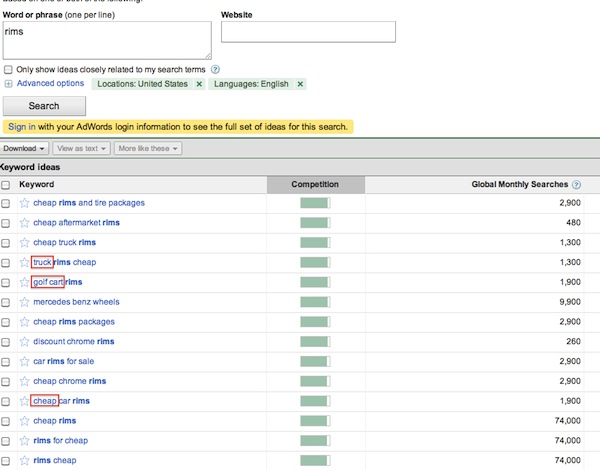
One easy way to leverage Google’s historical data on keyword combinations is by using the Google Adwords Keyword Tool.
For instance, if we’re advertising high-end custom car rims, we’ll want to add as negatives for products we don’t carry, or customers we don’t want (aka. people searching for “cheap”). Additionally, we might be interested to see what additional terms Google says are commonly used in searches for our phrases (particularly when broad match goes bad).
You’re Not Going to Cover Every Negative With a Brand New Campaign
One of the most effective ways of isolating negative keywords can only happen after you’ve been running your campaign for a few weeks. Google now provides much-improved reporting on users’ actual, exact search query.
Using the “See Search Terms” report when you’re on the adgroup’s Keyword tab can show you terms Google is incorrectly matching your keyword to.
Negative Match Types
Negative keywords can be entered with the same three match types as regular keywords: exact, phrase, and broad.
If there’s a chance that adding your keyword broad match negative (i.e. no quotes or square brackets) is going to limit your campaign’s ad impressions, you may want to get more specific in telling Google when you’re not OK with that negative. With negatives, using the broad and phrase matching will prevent your ad from showing more than an exact match negative.
If the negative keyword is clearly off-topic, broad match is typically the best choice.
What’s your favourite method for digging up negatives? Share them in the comments!



* g wonderwheel (with scraper)
* keywordspy
* premade lists, broken up by type of client (e.g. http://www.komarketingassociates.com/blog/200-plus-negative-keywords-to-consider-for-b2b-ppc/ )
* http://www.wordstream.com/negative-keywords
no magic bullet but most of the tools provide slightly different sets of data. And of course, reviewing keyword lists periodically with clients is key to get that deeper industry experience. Mouse repellent, probably don’t need much hand-holding. But solid-state rockets or industrial wind turbines? Yes.
05.03.11 at 2:25 pm
Nice! Thanks for sharing those Matt!
05.03.11 at 3:28 pm
Nice post – it never fails to amaze me how many adwords user don’t use Negative terms at any level, I recently viewed a set of campaigns who’s spend was over £200 a day – and not one negative term in sight
05.04.11 at 3:16 am
Hi Geordie,
You are writing that: “(…) impact your keyword relevance quality scores as well as keyword-level quality scores are heavily measured based on ad click-through rates (CTR), and the more often your ad shows against irrelevant keywords, the lower your CTRs will be.”
But the Quality Score is measured by the keyword’s CTR that you are bidding on and not by the keywords CTR that extended broad match is triggering.
Therefor do negative keywords don’t affect the Quality Score.
Wouldn’t you agree?
05.06.11 at 7:49 am
Just a quick heads up – negative keywords / match types don’t affect quality score. That being said, negatives are extremely important.
Search query reports are my personal favorites.
05.06.11 at 3:48 pm
To clarify, adding negatives typically improves your keywords’ CTR as a byproduct of showing your ad more often against relevant queries, and conversely preventing your ads from showing on grossly unrelated searches. As with all increases in CTR, the net result is a general increase in the base keyword’s Quality Score.
05.06.11 at 5:47 pm
Can’t we just use only long-tail keywords ( many of them ) instead of using popular keywords with negative ruels ?
05.08.11 at 9:56 am
Wonderful in theory, negative keyword lists tend to be context specific. When I see what kind of unwanted clicks I get, it is rarely generic keys that bother me. On the contrary, we go deep into the competition and it’s all branded names.
08.12.11 at 9:11 am
I also like looking at the “Related Searches” for a query for both negative keyword ideas and words to add to a campaign.
09.25.11 at 4:09 am
Negative keyword research is pretty cool stuff to prevent misuse of money and efforts. Negative keywords should add on ad group level.
11.26.11 at 3:09 am
Just started doing adwords for one of my websites and your text helps..In last campaings i was paying too much on negative keywords
04.12.12 at 3:55 am
Google Keyword search terms tool is useful, but only shows the keywords that triggered an ad with click through. Is there any way to show all terms that triggered an impression but no click? Surely this would be more useful in spotting the sinners that need to be excluded.
07.31.12 at 12:34 pm
Our proven solution is to start with many exact matches and maybe one or two broad matches of two-word length. The aim is to watch “Search Terms” over time and from it extract “root” terms to use as additional exact matches.
For instance if you put in ‘drafting’ as a broad match and your Search Terms listed ‘drafting services Nova Scotia’, ‘drafting services russia’, ‘drafting services australia’ etc, you would at once add ‘drafting services’ as an exact match term. We’ve done this and have CTRs of between 6 and 9%.
Lucky Balaraman
11.01.12 at 1:51 pm
Good call about negative keywords. We’ve seen some benefits of exploring a variety of keywords not directly associated with our target customer or target business niche. Though, it’s a good idea to establish a right set of keywords early on and work for them.
03.17.15 at 10:00 am